
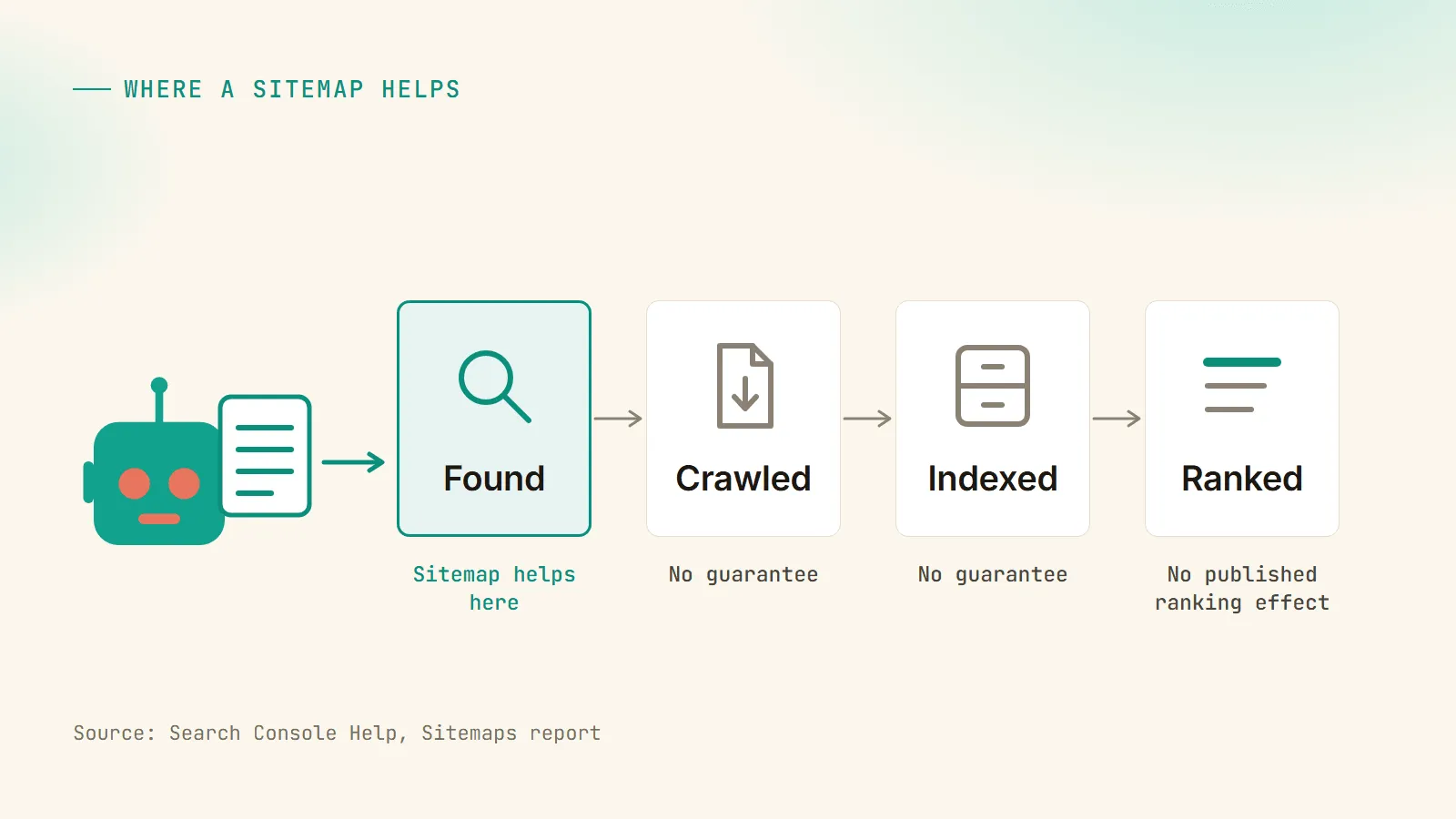
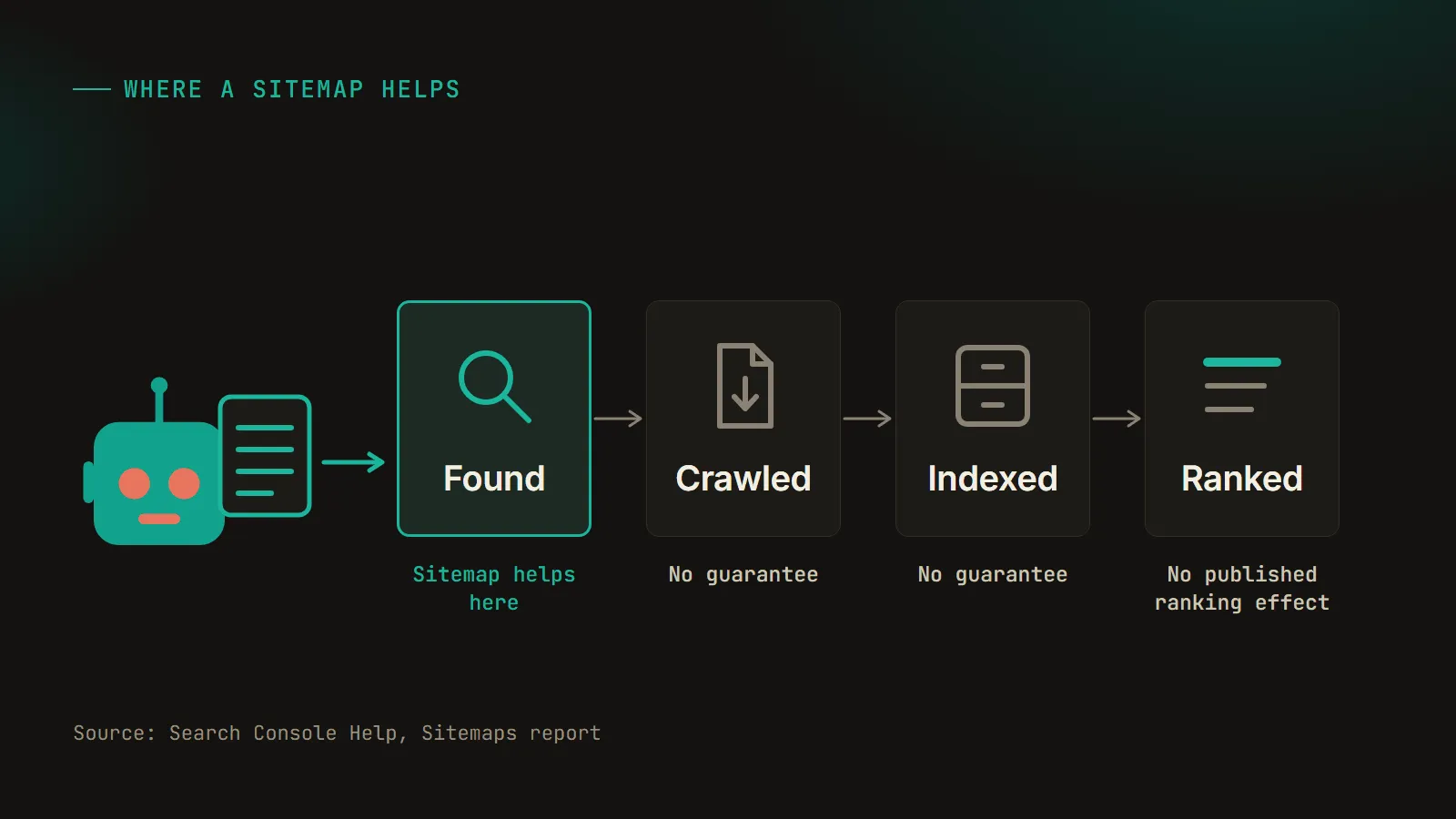
A sitemap is a file that lists the URLs on your site you want search engines to find (a URL being a page’s full web address), with optional detail about each page such as when it last changed or which images are on it.1 It’s usually an XML file at /sitemap.xml. Google and Bing both read them,2 though Google’s Search Console help says a URL found in a sitemap has no guarantee of being crawled (fetched by Google’s bot) or indexed (stored so it can show up in results).3
For a small site where every page is linked from somewhere else, a sitemap is optional, and Google puts small at about 500 pages.1 My own site generates its sitemap from code, so I pulled the live file on November 4 to use as the example below.
What is a sitemap? XML vs HTML
XML sitemap
An XML sitemap is the version written for crawlers. XML is a plain-text format that wraps data in tags, and the sitemap format itself is defined by the protocol at sitemaps.org. Only three tags are required: <urlset> around the whole file, <url> around each entry, and <loc> holding the address. The protocol’s own wording is “All other tags are optional.”4 Google will also accept an RSS 2.0 or Atom 1.0 feed, or a plain text file with one URL per line.5
There are specialized versions for images, video and news. Google’s news sitemap takes up to 1,000 news:news tags per file and only wants articles created in the last two days.6
HTML sitemap
An HTML sitemap is an ordinary page of links to a site’s main sections and pages, for visitors who would rather scan a list than use the menu. None of the Google documentation I read covers HTML sitemaps or says what one does for rankings.
In UX and web design, a sitemap (or visual sitemap) means something else: a diagram of a site’s page hierarchy, drawn while planning the site. Bing’s and Perplexity’s AI answers both listed it as a third type when I asked, even though nothing about it goes on the live site.
What does an XML sitemap look like?
I cut my live sitemap from November 4, 2026 down to one blog post and one research study for this excerpt.
<urlset xmlns="http://www.sitemaps.org/schemas/sitemap/0.9" xmlns:image="http://www.google.com/schemas/sitemap-image/1.1">
  <url><loc>https://chrishumphrey.ai/blog/http-status-codes-seo</loc><lastmod>2026-10-01</lastmod></url>
  <url><loc>https://chrishumphrey.ai/research/ai-crawler-blocking-2026</loc><lastmod>2026-06-22</lastmod>
    <image:image><image:loc>https://chrishumphrey.ai/research/share/crawler-overview.png</image:loc></image:image>
    <image:image><image:loc>https://chrishumphrey.ai/research/share/crawler-posture.png</image:loc></image:image>
  </url>
</urlset>
My site runs on Astro, and a short script writes the sitemap each time the site builds. Static pages get a <loc> and nothing else. Blog posts and research studies also get a <lastmod> (last modified), taken from the post’s updated date, or the publish date if I have never updated it. The charts on my research pages are drawn in HTML and CSS, so there’s no image file on the page for Google to find, and each chart’s branded PNG is listed through Google’s image extension instead (the <image:image> lines). An exclude list keeps out pages that should never be in there: an error page, a private tracker, a couple of client intake forms. There is no priority or changefreq tag anywhere in the file.
The whole file is 4,841 bytes for 33 URLs.7 Each sitemap can hold 50,000 URLs or 50 MB uncompressed, which the protocol spells out as 52,428,800 bytes, so mine is using about 0.009% of what one file is allowed.54
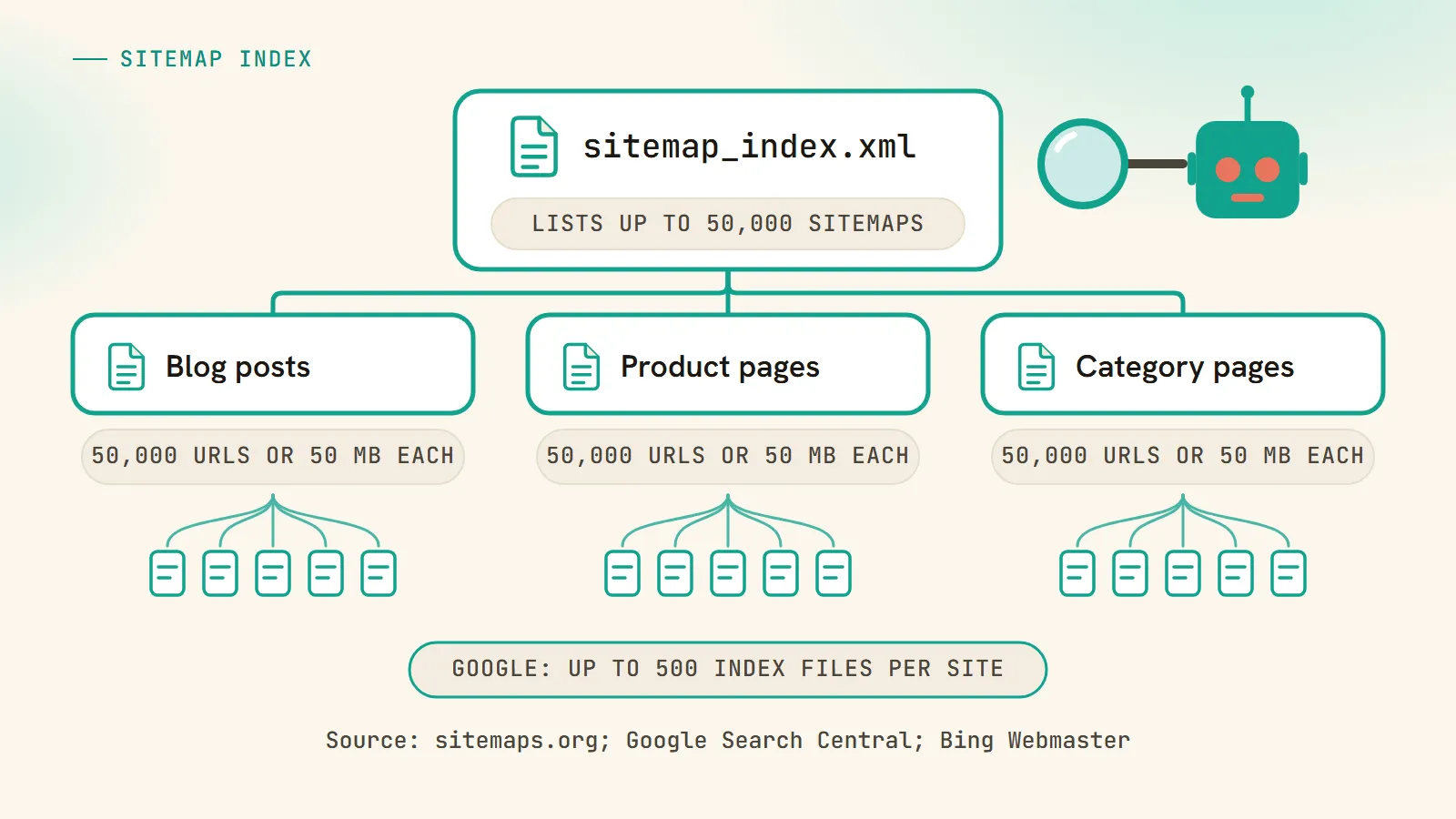
Bigger sites split their URLs across several sitemaps and tie them together with a sitemap index, which is a sitemap whose entries are other sitemaps. Google allows up to 50,000 <loc> entries in an index and up to 500 index files per site in Search Console.8 Bing’s limits work out to 50,000 child sitemaps per index and up to 2.5 billion URLs from one index file.2 Unless you submit it through Search Console, a sitemap only covers URLs under the folder it sits in, so a file at /blog/sitemap.xml can’t list your product pages.5
Which sitemap tags do Google and Bing use?
Both use <loc> and <lastmod>, and both ignore <priority> and <changefreq>. Google said so in June 2023 (“Google still doesn’t use the changefreq or priority elements at all”) and described priority as “a heavily subjective field.”9 Bing wrote in July 2025 that changefreq and priority “are ignored by Bing.”2 The protocol itself calls changefreq “a hint and not a command,” and a priority, which runs from 0.0 to 1.0 with a default of 0.5, only compares your pages with each other.4
Google and Bing both want an accurate lastmod. Google says lastmod needs to “consistently match reality,” means the last significant change to the page, and can go on every URL or just the ones you’re confident about.9 Bing calls lastmod “a key signal” and says the value should reflect “the true last modification time of the page content, not the sitemap file itself.”2 My static pages have no lastmod for that reason. I could stamp them with the deploy date, but I don’t keep a record of when the About page last changed, so any date I put there would be made up.
| Tag | What it says | Bing | My sitemap | |
|---|---|---|---|---|
<loc> | The page URL | Required by the protocol | Required by the protocol | Every entry |
<lastmod> | When the page last changed | Used if it “consistently match[es] reality” | Calls it “a key signal” | Posts and studies only, 22 of 33 |
<changefreq> | How often the page changes | Not used | Ignored | Not included |
<priority> | Importance, 0.0 to 1.0 | Not used | Ignored | Not included |
<image:image> | Images on the page | Documented as an extension | Not covered in the post I read | 14 entries on 3 pages |
Do you need a sitemap?
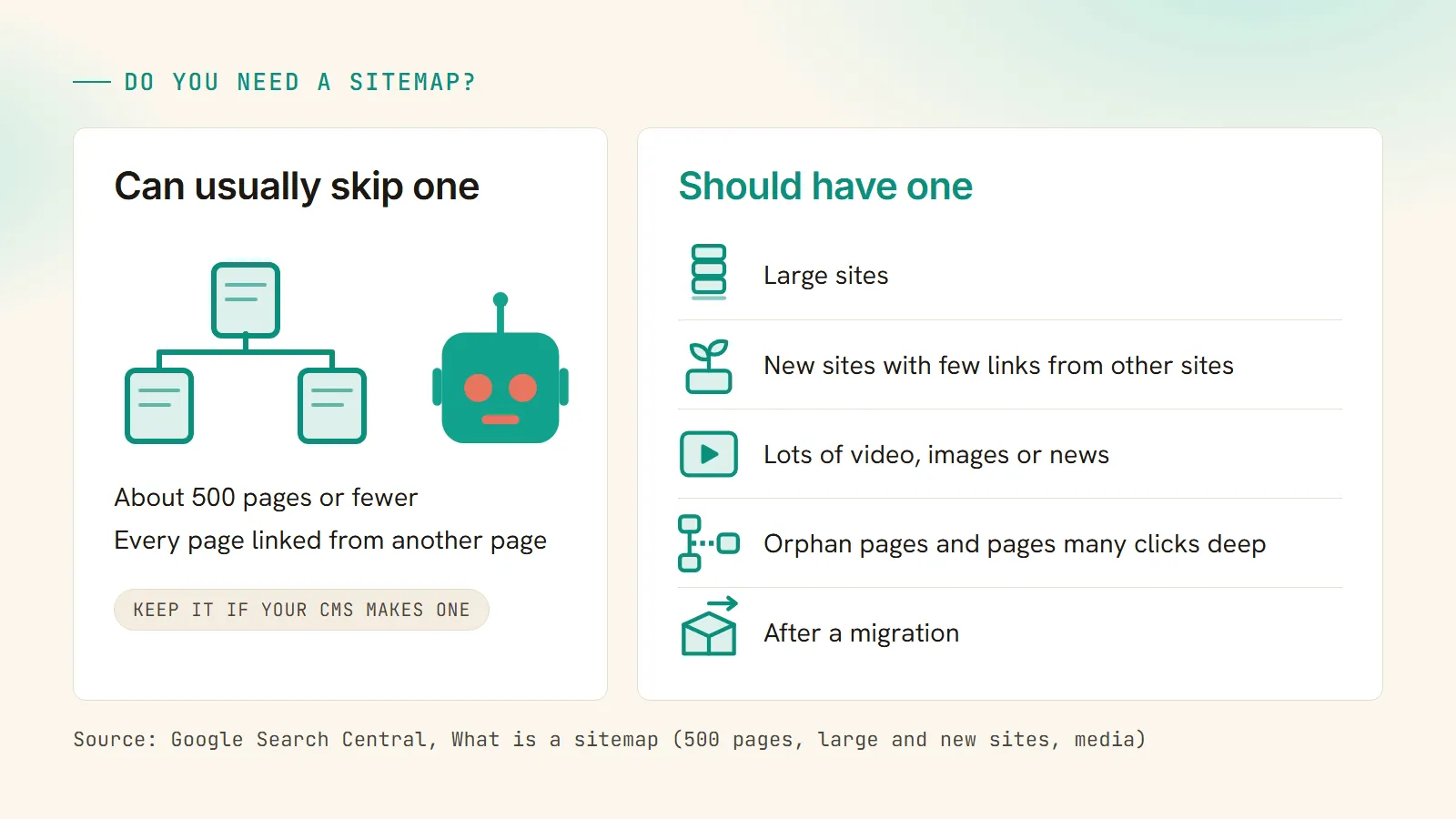
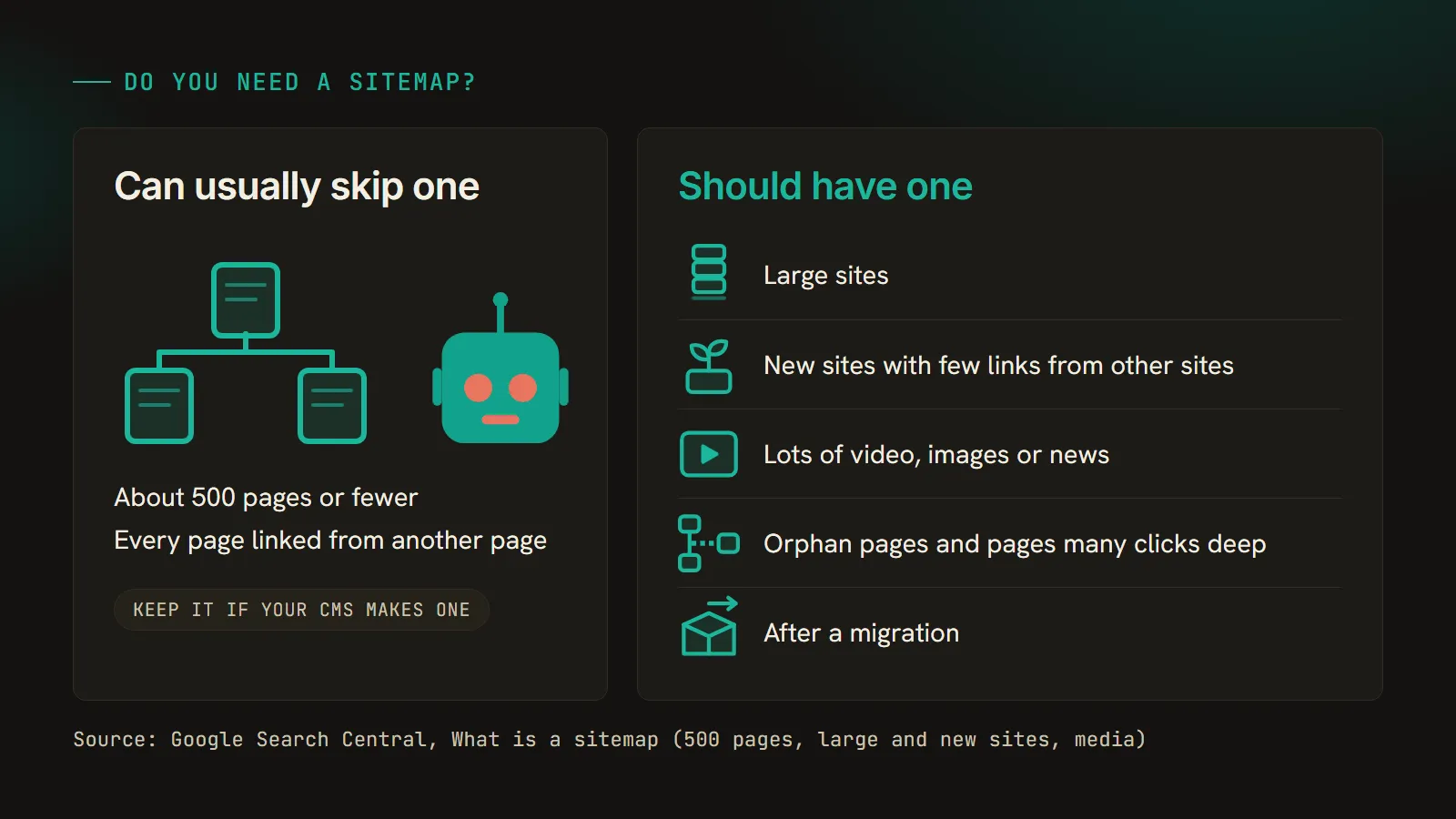
If your site has about 500 pages or fewer and every page is linked from somewhere else on it, Google can usually find everything without one. The 500 is Google’s figure: “By small, we mean about 500 pages or fewer on your site.”1 If your CMS already makes a sitemap, keep it and submit it, because it costs you nothing, but for a ten-page brochure site where you would have to build one by hand I’d skip it and spend the hour on internal links.
Google also says “in most cases, your site will benefit from having a sitemap,” and names where it helps most: large sites, new sites with few links from other sites, and sites with a lot of video, images or news.1 I wouldn’t skip it on a site with thousands of URLs, or one adding pages every day, since new pages need a way in front of Google before anything links to them. Orphan pages (nothing links to them) and pages buried many clicks deep need one too, since a crawler that follows links has no easy way to reach them. I’d also want one after a migration, listing only the final canonical URLs (the https ones, after an HTTP to HTTPS move) so Google has a clean list of where every page lives now. When I moved an 88-post blog to Astro, every URL stayed on its old permalink, which kept that part simple. On big sites, Jes Scholz has suggested splitting sitemaps by page type so the Search Console report shows indexing for each group separately.10
On November 4 I asked six AI engines, logged out, “do i need an xml sitemap for my small website.”11 Bing gave no AI answer. The other five all said a small site doesn’t strictly need one, and the four that put a number on small ranged from a 5-to-10-page brochure site to about 500 pages.
| Engine | What it said | What it counted as small |
|---|---|---|
| Google AI Overview | Don’t “strictly need” one, but “a good, low-effort best practice” | Under 50 pages |
| Google AI Mode | ”Strictly speaking, you do not need” one, but “highly recommended” | A 5-to-10-page brochure site |
| Perplexity | ”Probably not” | About 500 pages, citing Google |
| ChatGPT search | ”Don’t necessarily need” one, but recommends it | No number; answered by type of site |
| Brave | Not strictly necessary, but “highly recommended” | Under 500 pages |
| Bing | No AI answer | n/a |
I’d go by Google’s own documentation, which says about 500. Each engine only got the question once, so a rerun tomorrow could easily come back with different numbers.
What a sitemap does not do
Google’s Search Console help says “There is no guarantee that a page URL discovered in a sitemap has been or will be crawled or indexed by Google.”3 Submitting the sitemap is “merely a hint,” and Google says it “doesn’t guarantee that Google will download the sitemap” in the first place.5 (A 200 status code doesn’t guarantee indexing either, which I went through in the status codes post.)
I also don’t treat a sitemap as a ranking factor. It helps a page get found, which has to happen before it can rank, but nothing Google or Bing has published says being listed helps a page rank once it’s in the index.
Google also retired the ping URL, which sites used to hit to tell it a sitemap had changed. Its 2023 post says the deprecation “is complete,” and pings now get a 404 error back.9 Some of the guides ranking for this topic still include a ping step, which you can leave out.
How to find and submit a sitemap
To find a site’s sitemap, try /sitemap.xml on the domain first. If nothing’s there, open /robots.txt (the file that tells crawlers what they’re allowed to access) and look for a line starting with Sitemap:. Mine reads Sitemap: https://chrishumphrey.ai/sitemap.xml.
Google’s robots.txt documentation says the URL “must be a fully qualified URL, including the protocol and host,” meaning the whole https address; it “doesn’t have to be on the same host as the robots.txt file”; and it isn’t tied to any user agent, so it “may be followed by all crawlers.”12 robots.txt is also where AI crawlers get blocked or let in, and my AI crawler checker shows which bots can reach a given site. (When I read the robots.txt of 10,000 sites in June I didn’t record the Sitemap lines, which I’d do differently now.)
To submit to Google, use the Sitemaps report in Search Console, Google’s free dashboard for site owners. Submitting only means “telling Google where to find the file on your site,” and the report then shows one of three statuses: Success, Has errors, or Couldn’t fetch.3 For Bing it’s Bing Webmaster Tools, and Bing also recommends IndexNow “for real-time URL submission.”2 IndexNow is a protocol for notifying Bing and the other engines that take part whenever a URL is added or changed, without waiting for a recrawl.
Common sitemap mistakes
A sitemap shouldn’t list URLs you don’t want indexed: pages with a noindex tag, URLs that redirect, pages returning a 404, and duplicates whose canonical tag points somewhere else (the redirects, 404s and soft 404s post covers what each of those does to crawling). I’d say a sitemap that lists a noindexed page is sending Google two opposite signals about the same URL. It’s a cleanup job, and a smaller one than a stray noindex or Disallow on pages you do want indexed (that one costs traffic). My exclude list is there for this reason. Anything private or noindexed on my site has to go on it.
A lastmod stamped with the build time on every URL makes the date useless, since every page then claims it changed this morning, and both engines asked for the date the content changed. You also don’t need to resubmit in Search Console after every new post; neither the Google nor the Bing pages I read ask for it. Last, keep each file under the limits by splitting it with a sitemap index well before you get close to 50,000 URLs.
Do sitemaps matter for AI search?
Only through regular Search, as far as Google’s documentation goes. The AI features page on Search Central says a page has to be indexed and eligible to show in Search with a snippet, that there are “no additional requirements to appear in AI Overviews or AI Mode,” and that “You don’t need to create new machine readable files.”13 So a sitemap does the usual job there, getting pages found so they can be indexed and eligible for a snippet.
Bing’s July 2025 post has AI-powered search in its title, and its advice still comes down to an accurate lastmod and IndexNow.2 OpenAI’s crawler documentation explains how robots.txt controls OAI-SearchBot (sites that opt it out “will not be shown in ChatGPT search answers,” and a change takes about 24 hours to apply), and the page I read does not mention sitemaps.14 llms.txt doesn’t stand in for one either, since Google Search doesn’t use it.15
Across the 14 AI answers I captured on November 4, 10 cited Google’s Search Central documentation. Google’s AI Overview gave 2 answers, and neither cited Search Central; the sources it did cite included Quora and YouTube.11 It was one logged-out run, between 1:31 and 1:37 in the afternoon, Arizona time.
Frequently asked questions
Where do I find a website's sitemap?
Try the domain followed by /sitemap.xml first. If that returns nothing, open /robots.txt and look for a line starting with Sitemap:, which gives the full address. Some sites put a sitemap index there instead, a file that points to several smaller sitemaps, and the URLs are listed in those.
What is the difference between sitemap.xml and robots.txt?
robots.txt tells crawlers which parts of a site they may access, and it can include a Sitemap: line pointing to the sitemap. The sitemap is the list of URLs you want search engines to find. A site can have both, and the robots.txt line gives every crawler that reads the file a way to find the sitemap.
What is the difference between an XML sitemap and an HTML sitemap?
An XML sitemap is a file written for search engine crawlers that lists URLs and, optionally, when each page last changed. An HTML sitemap is an ordinary web page of links that visitors can browse. When people talk about sitemaps in SEO they nearly always mean the XML file.
Does a sitemap help my rankings?
Not directly. It helps search engines discover your pages, and Google says a URL found in a sitemap has no guarantee of being crawled or indexed. Nothing Google or Bing has published says that being listed in a sitemap helps a page rank once it is in the index.
How many URLs can a sitemap have?
Up to 50,000 URLs or 50 MB uncompressed per file, whichever comes first. Past that, split the URLs across several sitemaps and list them in a sitemap index file. Google allows up to 50,000 sitemap entries in one index and up to 500 index files per site in Search Console.
What is a sitemap.xml.gz file?
It is an XML sitemap compressed with gzip, which makes the file smaller to transfer. Google applies the 50 MB limit to the uncompressed size, so compressing a large sitemap does not let you fit more into one file. The 50,000 URL limit still applies too.
Are sitemaps still relevant with AI search?
Yes, for the same reason they matter in regular search: they help pages get discovered and indexed, and Google says a page has to be indexed and eligible for a snippet to appear in AI Overviews or AI Mode. Google also says no new machine readable files are needed for its AI features, so there is no separate AI version to build.
Is a visual sitemap the same thing as an XML sitemap?
No. In UX and web design, a sitemap or visual sitemap is a diagram of a site's page hierarchy, drawn while planning the site and often used alongside wireframes. It's a planning document, while an XML sitemap is a file on the live site that search engine crawlers read.
Keep going
More on crawling, indexing, and the other files crawlers read.
Sources
-
Google Search Central, What is a sitemap. Source for the definition, “in most cases, your site will benefit from having a sitemap,” “about 500 pages or fewer,” and the cases where a sitemap helps most (large sites, new sites with few external links, and sites with a lot of video, images or news content). ↩ ↩2 ↩3 ↩4
-
Bing Webmaster Blog, Keeping Content Discoverable with Sitemaps in AI-Powered Search (July 31, 2025). Source for lastmod as “a key signal” reflecting “the true last modification time of the page content,” changefreq and priority being ignored by Bing, IndexNow “for real-time URL submission,” and up to 50,000 child sitemaps and 2.5 billion URLs per sitemap index. ↩ ↩2 ↩3 ↩4 ↩5 ↩6
-
Search Console Help, Sitemaps report. Source for no guarantee that a URL discovered in a sitemap will be crawled or indexed, the definition of submitting a sitemap, and the Success, Has errors and Couldn’t fetch statuses. ↩ ↩2 ↩3
-
sitemaps.org, Sitemaps XML format. Source for the required
<urlset>,<url>and<loc>tags, “All other tags are optional,” the 50,000 URL and 50MB (52,428,800 bytes) limits, changefreq being “a hint and not a command,” with priority from 0.0 to 1.0 and a default of 0.5. ↩ ↩2 ↩3 -
Google Search Central, Build and submit a sitemap. Source for the RSS 2.0, Atom 1.0 and text formats, “All formats limit a single sitemap to 50MB (uncompressed) or 50,000 URLs,” the parent-directory scoping rule, and submission being “merely a hint” that “doesn’t guarantee that Google will download the sitemap.” ↩ ↩2 ↩3 ↩4
-
Google Search Central, News sitemap. Source for up to 1,000
news:newstags per sitemap and articles created in the last two days. ↩ -
My own sitemap, chrishumphrey.ai/sitemap.xml, fetched at 1:36 p.m. Arizona time on November 4, 2026: 33 URLs, 22 with a lastmod date, 14 image entries on 3 pages, no priority or changefreq tags, 4,841 bytes. ↩
-
Google Search Central, Manage your sitemaps with a sitemap index file. Source for up to 50,000
loctags in a sitemap index and up to 500 sitemap index files per site in Search Console. ↩ -
Google Search Central Blog, Sitemaps ping endpoint is going away (June 26, 2023). Source for Google not using changefreq or priority, priority as “a heavily subjective field,” lastmod needing to “consistently match reality” and meaning the last significant modification, setting lastmod on all pages or only the ones you’re confident about, and the completed ping deprecation with pings returning a 404. ↩ ↩2 ↩3
-
Search Engine Journal, Jes Scholz, What is a sitemap (February 19, 2025). Source for splitting sitemaps by page type to read indexing by section in Search Console. ↩
-
My own snapshot of AI answers, captured logged out in US English from Arizona on November 4, 2026, between 1:31 and 1:37 p.m. Three prompts: “what is a sitemap,” “do i need an xml sitemap for my small website,” and “how do i create and submit a sitemap to google,” across Google AI Overview, Google AI Mode, Perplexity, ChatGPT search, Bing and Brave. 14 complete answers were captured (one ChatGPT capture was incomplete and excluded, and Bing was not run on the third prompt). Google’s AI Overview gave no answer to the first prompt; its two answers cited Quora, YouTube and others, and neither cited developers.google.com. Each engine was asked once, so results are not repeatable. ↩ ↩2
-
Google Search Central, How Google interprets the robots.txt specification. Source for the Sitemap line needing a fully qualified URL, not having to be on the same host as robots.txt, and not being tied to a user agent. ↩
-
Google Search Central, AI features and your website. Source for the indexed and snippet-eligible requirement, no additional requirements to appear in AI Overviews or AI Mode, and no need to create new machine readable files. ↩
-
OpenAI, Overview of OpenAI crawlers. Source for sites opted out of OAI-SearchBot not being shown in ChatGPT search answers and robots.txt changes taking about 24 hours. The page does not mention sitemaps. ↩
-
Google Search Central, AI optimization guide. Source for Google Search not using llms.txt files. ↩
Working on this same shift?
I write about SEO, GEO, and getting found by AI search.
If this resonated, I'd love to compare notes.